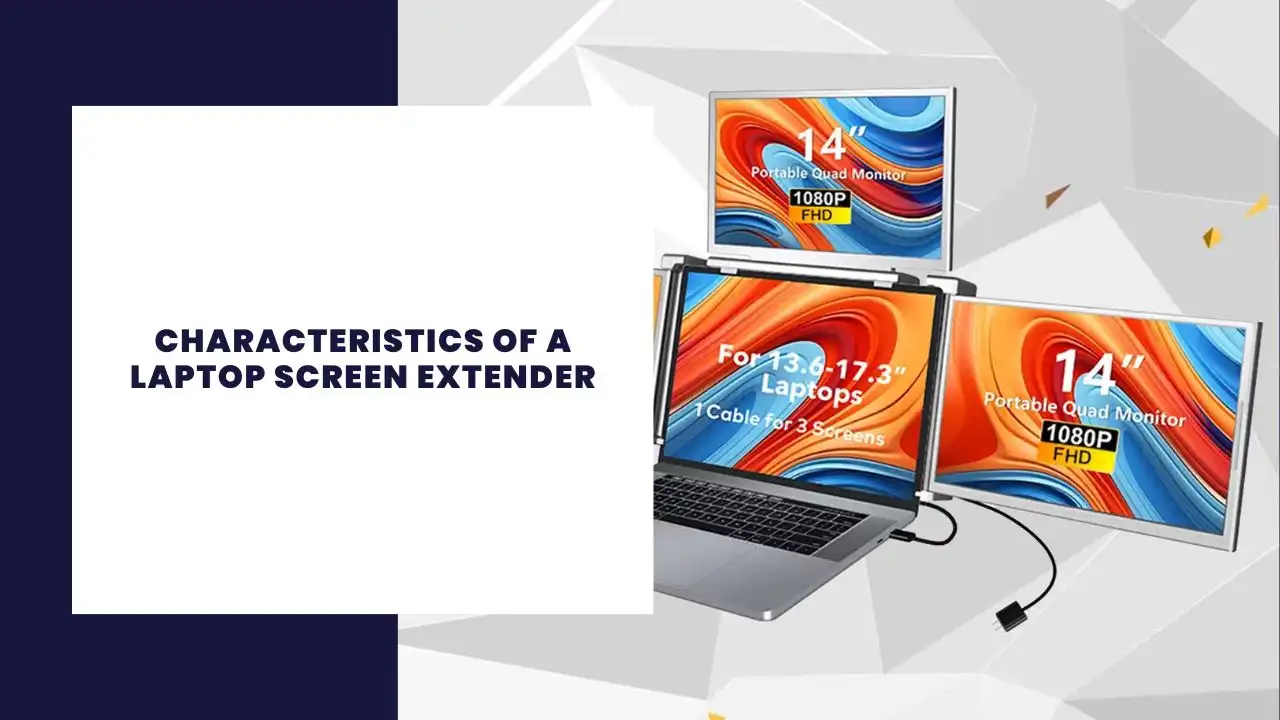
The modern workforce is becoming increasingly mobile, with many professionals relying on laptops to manage demanding tasks on the go. However, a single screen can sometimes limit multitasking and productivity. This is where a laptop screen extender proves essential. Whether you’re working remotely, traveling, or simply need more screen real estate, a portable monitor for your laptop can significantly improve your workflow. Here are the seven defining characteristics that make a laptop extender a must-have tool in 2025.
A defining trait of any laptop screen extender is its portability. Most laptop screen extender models, such as the 15.6-inch portable monitors, are ultra-slim and lightweight, making them ideal for travel monitors for laptops. Whether you’re a digital nomad or a corporate traveler, these devices can fit easily in your laptop bag without adding much bulk.
Many portable laptop screen extenders come with built-in stands, foldable frames, and protective covers, enhancing their portability. Despite their light weight, they provide the kind of second display that transforms your single screen setup into a dual-screen or even triple-screen workstation.
2. Plug and Play: No Hassle Installation
Modern screen extenders often feature plug-and-play functionality, meaning you can connect to your laptop without installing complex drivers or additional software. This is especially helpful for first-time users, freelancers, and business travelers who need a quick setup in unfamiliar environments.
Most extenders use USB-C to USB-C cables or standard USB and HDMI ports to establish a secure connection. Some also support mini-HDMI and DisplayPort inputs, enhancing compatibility with various laptop models, including MacBooks and Windows devices.
3. Screen Quality: Sharp, Vivid Displays
A screen extender is only as good as its display. Look for 1920×1080 full HD (FHD IPS) or 1080p IPS panels that offer vivid colors, sharp details, and wide viewing angles. The IPS displays deliver better pixel accuracy and consistency compared to TN or VA panels, making them perfect for designers, coders, or spreadsheet warriors.
With 60Hz refresh rates, these displays are ideal for seamless multitasking across multiple applications. A laptop extended monitor with 1080p resolution ensures your second screen keeps up with your primary laptop’s screen, providing a seamless experience.
4. Enhanced Productivity: Work Smarter, Not Harder
The biggest advantage of a laptop screen extender is its ability to enhance productivity. By allowing you to spreadsheet, code, design, or edit across multiple displays, your workflow becomes significantly more efficient.
Many users report a boost in performance when using a dual-screen or triple monitor for laptop setup. With more screen space, you can manage emails, write reports, conduct research, and join video calls simultaneously—without switching tabs or minimizing windows.
This increased digital real estate is crucial for long-term productivity, especially for professionals in finance, marketing, and design.
5. Compatibility and Connectivity: Universality Matters
A reliable laptop monitor extender should offer broad compatibility with a range of devices. Most modern external monitors for laptops support USB-C, HDMI port, and even DisplayPort connections, ensuring they work seamlessly with Mac, Windows, and even Linux systems.
The best models are compatible with Mac, Chromebooks, and various laptop models, supporting extended monitor modes, mirroring, or presentation displays. Whether you have one HDMI port or multiple USB-C ports, you’ll find a solution that fits.
Some extenders include built-in speakers, enhancing your immersive experience, especially during video editing or content consumption.
6. Multiple Screen Options: From Dual to Triple Displays
In 2025, triple laptop screen extenders are becoming more popular. These devices attach to your main laptop and provide two additional screens, creating a triple monitor workstation that’s ideal for power users and creatives alike.
For users who need more than just a second screen, these triple monitor for laptop solutions provide an unmatched ability to multitask and manage complex workflows. Whether you’re analyzing data, editing videos, or coding software, this setup offers true seamless multitasking.
If you’re looking to boost productivity, a portable triple monitor configuration may be the best investment.
7. Power Efficiency: Smart Use of Laptop Power
A well-designed laptop extender shouldn’t drain your laptop power excessively. Many newer models are optimized for energy efficiency, meaning they consume minimal power while still delivering high-quality visuals.
Some models can run directly from a USB-C port without needing external power sources. This makes them particularly useful for those on the move, who need to conserve battery life but still require an extended screen to work effectively.
The ability to power through one port keeps your setup clean and functional, making these devices both practical and sustainable.
Conclusion
A laptop screen extender is no longer a luxury—it’s a necessity for professionals who require flexibility, screen space, and productivity on the go. Whether you opt for a dual-screen or triple monitor setup, choosing the right external monitor for your laptop can transform your laptop into a full-fledged mobile workstation.
When selecting the right model, focus on portability, plug-and-play functionality, display quality, and power efficiency. With screen extenders now featuring 1080p IPS displays, USB-C connectivity, and broad compatibility, there’s a solution for every type of laptop user—from casual freelancers to seasoned remote workers.
With so many esim options available, it’s easy to compare travel esim features and select the right esim provider for your needs. By the time you travel in 2025, your gear should include not just a solid data plan, but also a robust laptop screen extender—your gateway to improved workflow, increased productivity, and enhanced digital freedom.
We use cookies on our website to give you the most relevant experience by remembering your preferences and repeat visits. By clicking “Accept”, you consent to the use of ALL the cookies.
This website uses cookies to improve your experience while you navigate through the website. Out of these, the cookies that are categorized as necessary are stored on your browser as they are essential for the working of basic functionalities of the website. We also use third-party cookies that help us analyze and understand how you use this website. These cookies will be stored in your browser only with your consent. You also have the option to opt-out of these cookies. But opting out of some of these cookies may affect your browsing experience.
Necessary cookies are absolutely essential for the website to function properly. This category only includes cookies that ensures basic functionalities and security features of the website. These cookies do not store any personal information.
Any cookies that may not be particularly necessary for the website to function and is used specifically to collect user personal data via analytics, ads, other embedded contents are termed as non-necessary cookies. It is mandatory to procure user consent prior to running these cookies on your website.