Welcome all AI enthusiasts! Are you amidst a packing frenzy or yearning for a summer trip?
No matter the situation, enjoy this curated ranking for embracing the summer vibe.
At ePassportPhoto, we were curious about what AI thinks about other AI tools, especially travel tools from our niche. So, we asked ChatGPT to rank the top passport photo-making AI services and explain its choices.
But that’s not all.
Double-checking activated! Besides the ChatGPT insights, we enriched this piece with the first-hand opinions of our biometric photography and travel (human!) experts. This way, it confronts both the AI and the human way of thinking.
Curious about the result?
A Chat-GPT-generated ranking of AI tools that allows you to take a passport photo online
Automatic adjustments for lighting, size, and background.
Disadvantages:
Limited customization options and lack of extensive control over fine-tuning photos.
May not support all countries' passport photo guidelines.
Availability and performance may vary based on several factors, including server load, internet connection stability, and overall system performance.
Human expert’s comment:
Taking a passport photo with the tool is a truly seamless experience. Thanks to its powerful AI, the photo is cropped, the background deleted, and the lighting adjusted according to the standards required. You can also get a printout within 2-4 days with no delivery fee!
Designed specifically for creating passport and visa photos.
Automatic adjustment of images to meet official specifications.
Supports requirements of various countries.
Disadvantages:
May have limited editing capabilities.
User experience and interface is less intuitive.
The accuracy of facial recognition may vary.
Human expert’s comment:
Thanks to Visafoto’s 99,7% pass rate, you can be sure your passport photo will be accepted by authorities. Having this assurance of acceptance relieves a lot of travel stress, making it one of the best AI-driven passport photo tools. The only thing I miss from the tool is the ability to order physical prints.
Easy upload and selection of desired country's requirements.
Facial recognition technology adjusts photo for size, background, and positioning.
Can handle multiple country guidelines.
Disadvantages:
Limited editing tools and customization options.
Accuracy of facial recognition may vary.
Potential differences in compliance with specific country regulations.
Human expert’s comment:
What makes this tool one of the best tools for taking passport photos? International delivery. Digital passport applications are not available in every country. This solution is priceless when you need to bring a printed version in person.
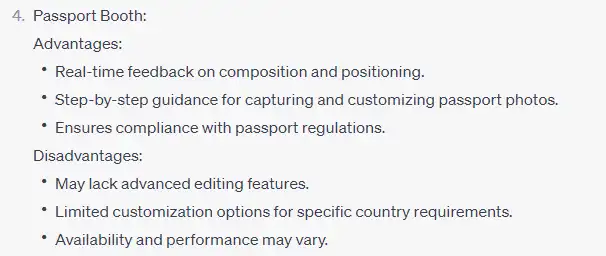
Real-time feedback on composition and positioning.
Step-by-step guidance for capturing and customizing passport photos.
Ensures compliance with passport regulations.
Disadvantages:
May lack advanced editing features.
Limited customization options for specific country requirements.
Availability and performance may vary.
Human expert’s comment:
Passport Booth is an absolute game changer for busy people. It’s free and simple to use on your phone. What I enjoyed the most was the real-time feedback of the app – it helped me make a correct photo for my passport.
Automatic adjustment of photos to meet specific country requirements.
Supports multiple country guidelines.
Easy upload and creation process.
Disadvantages:
Limited editing tools and customization options.
Accuracy of facial recognition may vary.
User interface may be less intuitive.
Human expert’s comment:
One thing I can say for certain about IDPhoto4You is that it’s very convenient. The interface is simple enough, although it could use a modern, more aesthetic look. Still, it’s neat that you don’t have to download a thing. Ultimately, it offers pretty much everything you’d expect from free passport photo software, which helps you get your documents ready without leaving home.
Simplified step-by-step process for capturing and editing passport photos.
Offers compliance with standards set by different countries.
User-friendly interface.
Disadvantages:
Limited customization options for specific country guidelines.
May lack advanced editing features.
Accuracy of facial recognition may vary.
Human expert’s comment:
ePassportPhoto’s interface is user-friendly, allowing you to easily upload your photo and make necessary adjustments without any hassle. While it may not boast the most modern or visually appealing design, its convenience is undeniable.
Comprehensive set of features for creating passport photos.
Allows for image upload and necessary adjustments.
Provides templates for different countries' passport requirements.
Disadvantages:
Potential limitations in free or trial versions.
User experience and interface might be less intuitive.
Availability and performance may vary.
Human expert’s comment:
At the heart of any online passport photo tool is an efficient AI algorithm. It decides how quickly a customer will get a perfect photo that meets official requirements. In the case of Passport Photo Maker, this algorithm works flawlessly, keeping mistakes to a minimum and ensuring official approval.
Let’s close with a brief overview of the top advantages.
Although each tool on this ranking is unique, there are certains aspects they all have in common. Here are some key shared features of the best AI passport photo tools:
Compliance check: a reliable passport photo service ensures the photo meets all requirements.
Automatic photo editing: AI algorithms are responsible for turning selfies into document photos, including cropping and removing the background and shadows.
Expert verification: a human expert reviews the edited version of a photo to ensure it complies with government regulations.
Convenience: no registration is needed, and expert verification is available 24/7.
Large database of countries: online passport photo services support many official documents for various countries (driver’s license, ID photos, visa photos).
This analysis is brought to you by ePassportPhoto, an expert in passport photo services and industry research.
ePassportPhoto offers a seamless solution for capturing high-quality pictures for official documents. Beyond providing passport and visa photo services, ePassportPhoto delves into cutting-edge trends and conducts research in the travel and AI sectors.
We use cookies on our website to give you the most relevant experience by remembering your preferences and repeat visits. By clicking “Accept”, you consent to the use of ALL the cookies.
This website uses cookies to improve your experience while you navigate through the website. Out of these, the cookies that are categorized as necessary are stored on your browser as they are essential for the working of basic functionalities of the website. We also use third-party cookies that help us analyze and understand how you use this website. These cookies will be stored in your browser only with your consent. You also have the option to opt-out of these cookies. But opting out of some of these cookies may affect your browsing experience.
Necessary cookies are absolutely essential for the website to function properly. This category only includes cookies that ensures basic functionalities and security features of the website. These cookies do not store any personal information.
Any cookies that may not be particularly necessary for the website to function and is used specifically to collect user personal data via analytics, ads, other embedded contents are termed as non-necessary cookies. It is mandatory to procure user consent prior to running these cookies on your website.