For many small and medium-sized business owners, content creation feels like a constant uphill battle. You want professional-grade videos and images, but hiring agencies is expensive, freelancers are unpredictable, and manual production takes way too much time. MakeShot was built to solve exactly this problem — a unified AI Video Generator and AI Image Creator powered by top-tier models including Sora 2, Veo 3, and Nano Banana Pro.
If you’re looking to scale marketing, simplify workflows, and reduce production costs without sacrificing quality, this guest post will walk you through why MakeShot stands out and how to use it to transform your business.
What Is MakeShot?
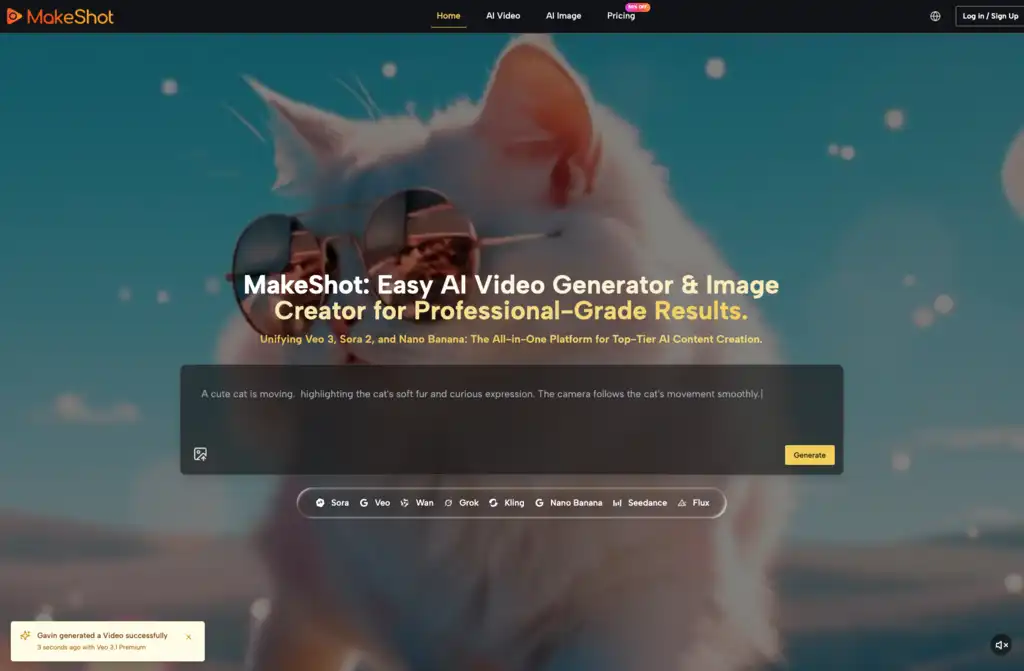
MakeShot is an all-in-one AI video and image creation studio designed for entrepreneurs who need fast, reliable, and professional output. Instead of juggling subscriptions across multiple tools, MakeShot combines everything into one interface — your AI Video Generator, AI Image Creator, asset library, and workflow hub.
Inside MakeShot, you get direct access to industry-leading AI models:
- Veo 3 — photorealistic visuals + native audio generation
- Sora 2 — cinema-grade storytelling
- Nano Banana Pro — hyper-realistic images
- Grok — stylized, experimental imagery
- Seedream — ultra-fast generation for daily content
MakeShot isn’t just a convenient bundle — it’s a true productivity engine for marketers, creators, and business owners who need more content with fewer resources.
Why MakeShot Matters to SMB Owners
(And Why It’s Different From Every Other AI Video Generator or Image Tool)
Most businesses use content to communicate, educate, and sell — but traditional production is expensive. A single product video can cost hundreds or thousands of dollars. Revisions take weeks. Creative testing becomes impossible.
With MakeShot’s AI Video Generator and AI Image Creator, you can:
- Produce studio-grade visuals without hiring a team.
- Test dozens of creative variations in minutes.
- Maintain brand consistency at scale.
- Create full campaigns without touching a camera.
- Reduce production costs by up to 80%.
As someone who has used dozens of AI tools over the years, MakeShot feels different because it lets me work the way I want. It’s fast, it’s reliable, and the outputs are consistently strong across different genres — something most AI tools struggle with.
The Core Advantage: Unified AI Video Generator + AI Image Creator
Most platforms force you to subscribe to individual models. Want Sora 2? Separate subscription. Want high-end image generation? Another subscription. Need character consistency? Good luck managing that across platforms.
MakeShot solves this pain by giving you everything under one roof:
- Access Multiple Premium Models in One Platform
You can switch instantly between:
- Veo 3 for photorealistic videos with synchronized audio
- Sora 2 for cinematic storytelling
- Nano Banana Pro for ultra-realistic product shots
- Grok for stylized or creative visuals
- Seedream for fast iterations
This means you always pick the ideal model for each creative task.
- One Subscription, One Asset Library
No more scattered files. No more paying for five tools.
- Side-by-Side Model Comparison
This is one of my favorite features. Generate the same prompt using multiple models, compare results instantly, and choose the best version. This dramatically speeds up decision-making and boosts content quality.
How MakeShot Helps Businesses Create Better Content Faster
Social Media Content Creation
Small teams love MakeShot because the AI Video Generator and AI Image Creator streamline the entire workflow. Need 30 videos this month? Need 60 images for Instagram? With MakeShot, that’s finally doable.
Use:
- Veo 3 for engaging short-form videos
- Nano Banana Pro or Seedream for striking image posts
I’ve helped several clients move from posting 3 times a week to posting daily simply because MakeShot’s output is consistent, reliable, and easy to scale.
Marketing & Advertising Campaigns
Marketing is all about speed. Trends move fast, and brands that react quickly win. MakeShot makes this possible with:
- Product demo videos using Sora 2
- Ad creatives using Grok
- Brand assets using Nano Banana Pro
The biggest win here is creative testing. You can generate 20 variations of the same ad concept in minutes and pick the highest-converting one — no expensive photoshoots required.
YouTube Content & Film Production
Creators often struggle with pace — writing scripts, shooting, reshooting, and editing. MakeShot helps by generating:
- Cinematic sequences using Sora 2
- Photorealistic B-roll using Veo 3
- Visual effects and background shots
I’ve personally used MakeShot to help a YouTube client reduce production time from 8 hours per video to under 2 hours, largely thanks to MakeShot’s AI Video Generator producing perfect B-roll without reshoots.
E-Commerce & Product Visualization
If you sell products online, MakeShot becomes your always-available studio. Use Nano Banana Pro to generate:
- Lifestyle photos
- Product mockups
- Packaging concepts
- Seasonal image sets
You can visualize products in any environment without booking locations or photographers.
Key Features That MakeShot Users Love
- Multi-Model Access
Use Veo 3, Sora 2, Nano Banana Pro, Grok, and Seedream without switching platforms.
- Native Audio With Veo 3
This is a major game changer.
Most AI Video Generator platforms generate visuals only — audio must be added manually later.
Veo 3 automatically creates:
- Dialogue
- Sound effects
- Ambient soundscapes
This saves hours of editing time and produces videos that feel complete immediately.
- Up to 4 Reference Images With Nano Banana Pro
Consistency matters — especially for brands.
Nano Banana Pro allows you to upload up to four reference images to:
- Maintain character identity
- Preserve product style
- Keep branding coherent
- Full Commercial Rights
Everything you create is yours. No watermarks. No attribution. No hidden licensing.
- Fast Generation Times
MakeShot optimizes each model so results come quickly without sacrificing quality.
Real Use Cases: Before & After Transformations
Case Study 1: Social Media Manager
Before:
A small business owner struggled to maintain consistent posting because content took hours to produce.
After Using MakeShot:
- Daily posting achieved
- AI Image Creator handled visuals
- Veo 3 produced TikTok-ready video content
- Engagement increased 45% within 30 days
Case Study 2: E-Commerce Store
Before:
Expensive photoshoots delayed product launches.
After MakeShot:
- Nano Banana Pro generated realistic lifestyle shots
- Sora 2 produced short product showcase videos
- Launch timelines accelerated significantly
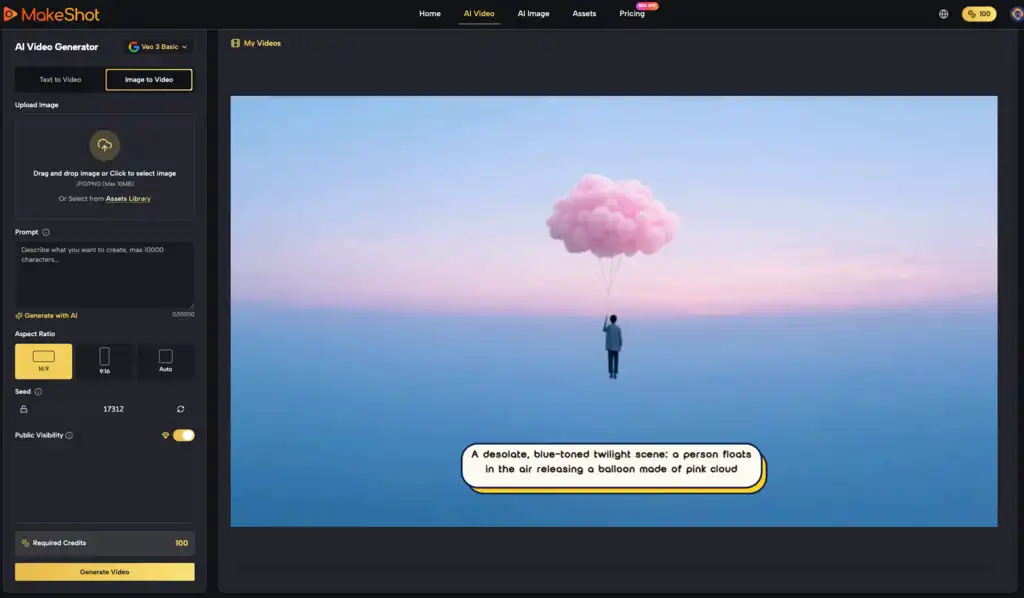
Step-by-Step Guide: Creating Your First Project on MakeShot
Step 1: Choose Your Content Type
Select either the AI Video Generator or AI Image Creator.
Step 2: Pick a Model
Choose from:
- Veo 3
- Sora 2
- Nano Banana Pro
- Grok
- Seedream
Step 3: Add References (Optional)
Upload reference images if you want consistency, especially with Nano Banana Pro.
Step 4: Write Your Prompt
Describe the scene, style, tone, and motion (for video).
Step 5: Compare Outputs
View side-by-side results to pick your favorite.
Step 6: Export & Publish
Download your visual in high resolution with full commercial rights.
Best Practices for Using MakeShot Effectively
- Start With Multiple Models
Because MakeShot includes Sora 2, Veo 3, and Nano Banana Pro, always test prompts across models first. You’ll learn very quickly which model best fits which content type.
- Use Reference Images for Branding
If your business has a mascot, spokesperson, or signature product style, reference images are your best friend.
- Keep Prompts Short, Then Refine
Ask MakeShot to “expand detail” after you get a baseline output.
- Build a Template Library
Reuse your strongest prompts to maintain consistent content across channels.
Final Thoughts
MakeShot is more than an AI Video Generator or AI Image Creator — it’s a complete, unified creative studio built with SMB owners in mind. Whether you’re scaling marketing campaigns, improving product visuals, or accelerating content creation, MakeShot gives you the tools to produce professional results quickly and affordably.
If you’re looking for a platform that combines high-end AI models like Sora 2, Veo 3, and Nano Banana Pro with a workflow that actually makes sense for business, MakeShot is absolutely worth trying. Let me know if you’d like a shorter version, meta description, or social promo snippet!