What Is a Laptop Screen Extender?
The demand for flexibility, mobility, and efficiency has changed the way people work, play, and communicate. For professionals, creatives, students, and gamers alike, the traditional single screen setup often feels limiting. This is where a laptop screen extender enters the picture. Acting as an additional screen, a laptop screen extender helps users boost productivity, enhance multitasking capabilities, and create a more immersive workspace—all without sacrificing mobility.
Whether you’re editing videos, analyzing spreadsheets, or gaming on the go, portable monitors and laptop monitor extenders have become essential accessories for a modern digital lifestyle. Let’s explore how this portable device that adds value to your setup can transform the way you use a laptop.
Written by
- Redaction Team
- Business Technology, Entrepreneurship
Table of Contents
1. Understanding a Laptop Screen Extender
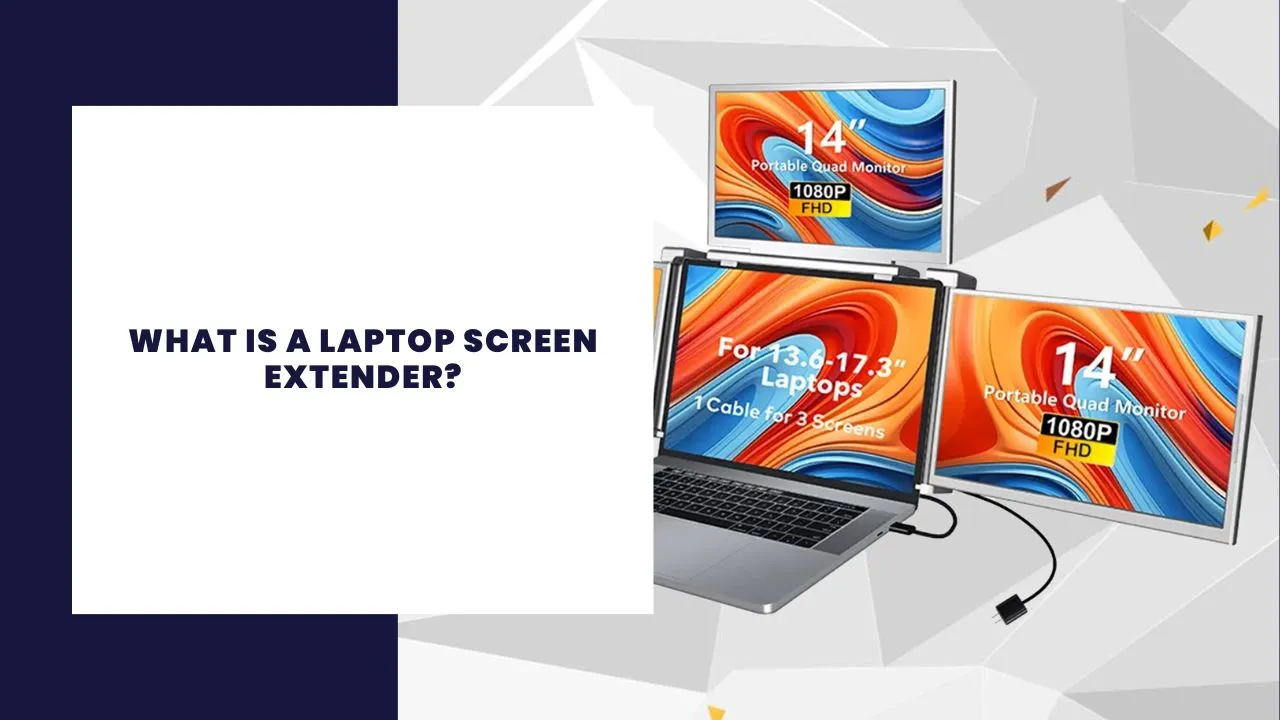
A laptop screen extender is an external portable monitor that connects to your laptop and provides additional screen space. It enables users to set up a dual screen or even triple screen environment for better multitasking.
Unlike desktop monitors, laptop extenders are compact, lightweight, and designed to attach directly to your laptop or stand independently beside it. Most are powered via USB-C or HDMI connections and don’t require complex setup processes. Many portable monitors support full HD resolution with quality color accuracy, adjustable brightness, and a refresh rate that ensures smooth visuals whether you’re gaming, designing, or simply working with documents.
2. Evolution of Portable Monitor Technology
The evolution of portable monitor technology has rapidly advanced in recent years. Earlier, users had to rely on bulky external displays with limited compatibility and poor display quality. Today, you can find ultra-slim, high-resolution portable monitors that come with adjustable stands, built-in speakers, and various input options like USB-C with DisplayPort, HDMI, and even DisplayPort support.
These advancements have made laptop screen extenders more accessible and functional for a wide audience. Whether you are in an office, at home, or traveling, you can easily use portable monitors without needing a dedicated power source in some cases.
3. Benefits of Using a Laptop Screen Extender
The advantages of using a laptop monitor extender go beyond just visual appeal. They address productivity, convenience, and ergonomics.
Boosting Productivity
With a second screen, users can multitask efficiently. From coding and content creation to video editing and virtual meetings, extending your laptop screen helps eliminate the need to constantly toggle between tabs or applications. This not only boosts productivity but also reduces eye strain during long work sessions.
Enhanced Screen Real Estate
By adding an extra screen, users significantly increase their available screen real estate without sacrificing portability. This is particularly useful for laptop users who deal with data-heavy applications or run multiple programs simultaneously.
Better Monitor Setup for Creatives
Designers and editors can benefit from color accuracy, high refresh rate, and full HD IPS display that many portable monitors offer. You can also mirror your laptop screen and portable monitor for presentations or extend them for project management and media editing tasks.
4. Monitor Setup and Connectivity
When choosing a laptop screen extender, it’s crucial to understand how monitor setup works. Most portable monitors connect via a single USB-C port, USB-C to HDMI adapter, or DisplayPort cable. Some high-end options like the HP USB-C Travel Hub G3 or HP 410 Slim Silver Bluetooth accessories offer added convenience through adapter solutions for legacy ports.
Before purchasing, ensure your laptop has the appropriate ports and power and video capabilities to support one or two external displays. Some laptop extenders also require external power, especially those with larger screen sizes or high-brightness displays.
5. Compatibility and Choosing the Right Device
Compatibility is key when considering an extender for laptop use. Not all laptops support dual or extended display features, and not all portable monitors are universally compatible.
Before making a decision:
Consider your specific needs – whether you need it for gaming, office work, or creative projects.
Confirm if the laptop as secondary screen feature is supported.
Check the monitor resource usage for battery efficiency.
Ensure the extenders are designed to match your specific laptop brand and configuration.
Also, if you’re planning to use your laptop screen extender or laptop extended frequently on the go, ensure it fits easily into your laptop bag and offers plug-and-play compatibility.
6. Productivity Gains from Laptop Screen Extension
The biggest reason to invest in a laptop screen extender is the potential to increase productivity. Whether you’re part of a digital marketing team juggling content and analytics or a developer switching between IDEs and browsers, more screen real estate equals more efficiency.
Use Cases That Boost Productivity
Video editing with timeline on one screen and preview on another
Comparing spreadsheets or data sets side-by-side
Keeping a communication window (Slack, Zoom) open while working
Monitoring dashboards or external displays for real-time analytics
Using multiple screens enhances workflow and enables faster decision-making and better focus.
7. Screen Extenders vs. Traditional Monitors
When considering a screen extender or laptop extended setup, how does it compare to traditional monitors?
Traditional desktop monitors offer large displays and better specs but sacrifice portability. A portable monitor for laptop, on the other hand, provides convenience, mobility, and enough screen real estate to meet the needs of modern users.
Screen extenders typically weigh under 2 lbs, can be powered through a single cable, and support versatile monitor to your laptop configurations. They are perfect for business travelers, students, and hybrid workers who rely on portable setup solutions.
Conclusion
A laptop screen extender is more than just an external monitor—it’s a gateway to an efficient, organized, and highly productive workspace. It helps you manage your monitor setup, enhance screen space, and boost your productivity without tying you down to a fixed location.
Whether you’re looking to use a laptop more efficiently, or need a portable device that adds value to your monitor setup, the growing selection of portable monitors makes it easier than ever to find the right fit. From triple monitor for laptop configurations to simple dual monitor extensions, the options are plentiful.
By understanding the evolution of portable monitor technology and identifying your compatibility needs, you can unlock the full potential of your laptop screen extension—and take your digital experience to a whole new level.
Tags: laptop screen extender, monitor, portable monitor, dual screen, productivity, workspace, laptop monitor extender, triple screen, screen extender or laptop extended screen, portable setup, external monitor, portable monitors offer, screen real estate.
More about Business Technology