
A proxy has two addresses, and most failed checks come from looking at the wrong one. The entry address is the host and port in your settings, such as 203.0.113.10:8000. The exit IP is the address a website writes into its logs when your request arrives. On a static datacenter proxy the two usually match. On a rotating residential gateway they almost never do.
For most setups, how to check a proxy server’s IP address comes down to one comparison. Ask an echo service for your IP twice, once directly and once through the proxy:
curl -s https://api.ipify.org
curl -s -x http://USER:[email protected]:8000 https://api.ipify.org
If the first command prints your own address and the second prints the proxy’s, that client is routed correctly. It proves nothing about your browser, DNS lookups or WebRTC, which take separate paths and fail separately.
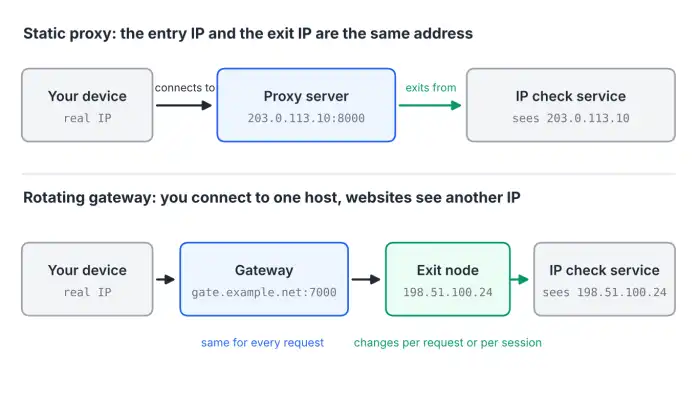
Proxy address vs exit IP: what you are actually checking
A proxy server address is the host and port your software connects to. The host can be an IP or a name like gate.example.net. Squid listens on 3128 by default and SOCKS on 1080, but commercial gateways use custom port ranges where the number can select a country or a session.
A static datacenter or ISP proxy forwards traffic from the server that accepted it, so the IP in your dashboard is the exit IP. Rotating residential and mobile products put a gateway in front of a pool of peers: the hostname stays fixed while the exit IP changes per request or per session. Default sticky sessions at Oxylabs and Decodo last 10 minutes and stretch to 1,440; IPRoyal allows up to 7 days.
IPv6 adds a twist. Much software accepts only IPv4 proxy addresses, so Proxys.io delivers IPv6 proxies through an IPv4 tunnel and switches to IPv6 on its own servers. The exit IP is then IPv6, and a checker that listens only on IPv4 simply fails to load.
How to find your proxy server address on any device
Windows 10 and 11
Open Settings > Network & internet > Proxy. Manual proxy setup shows the address and port; Automatic proxy setup shows a PAC script URL and the “Automatically detect settings” switch (WPAD). Windows also keeps a second proxy setting for system services:
reg query “HKCU\Software\Microsoft\Windows\CurrentVersion\Internet Settings”
netsh winhttp show proxy
The first command lists ProxyEnable, ProxyServer and AutoConfigURL for the current user. The second shows the WinHTTP proxy used by Windows Update and many services. It often says “Direct access (no proxy server)” while the user setting points at a proxy, which is why a service on the same machine can still show your real IP.
macOS
Go to System Settings > Network, select Wi-Fi or Ethernet, click Details, then Proxies. Web Proxy (HTTP) and Secure Web Proxy (HTTPS) are separate fields, so a proxy entered only under HTTP leaves every HTTPS site going direct. In Terminal, scutil –proxy prints the active configuration, and networksetup -getsecurewebproxy “Wi-Fi” shows the HTTPS entry alone.
Linux
GNOME stores its own setting (gsettings get org.gnome.system.proxy mode), but command-line tools read environment variables, which env | grep -i _proxy lists. Two details catch people. http_proxy covers only http:// URLs, so HTTPS requests go direct unless https_proxy is set too. And NO_PROXY beats an explicit curl -x: on our test bench (Ubuntu 24.04, curl 8.5.0, Squid 6.14), a host listed in NO_PROXY returned HTTP 200 while the Squid log stayed empty. No warning at all. Judge the route by the exit IP or the proxy log, never by the status code.
Browsers, Android and iPhone
On Windows and macOS, Chrome and Edge use the operating system’s proxy. Firefox has its own panel under Settings > General > Network Settings. To see what Chrome actually uses, open chrome://net-internals/#proxy; it also reflects a –proxy-server launch flag, which the normal settings page never mentions. On Android, the proxy belongs to the Wi-Fi network (Edit > Advanced options > Proxy). On iPhone and iPad it is Settings > Wi-Fi > (i) > Configure Proxy.
PAC files and WPAD
A URL instead of an address means a PAC script chooses the proxy. Download it and search for PROXY and SOCKS5 return values. Chrome falls back to a direct connection without any message when the script has a syntax error, cannot be downloaded, or returns HTTP instead of PROXY. On a managed laptop, trace an unexpected real IP to the script before you blame the proxy.
How to check the exit IP that websites see
In the browser
Open an IP lookup page in the browser profile that uses the proxy: ipinfo.io, whatismyipaddress.com and browserleaks.com/ip all work. Any “what is my IP” page doubles as a proxy IP checker, since it reports the address the connection arrived from. Read the ASN as well as the IP. A datacenter proxy shows a hosting company, a residential one shows a consumer ISP. Country and city come from a geolocation database, and every service uses its own.
From the command line
curl gives the cleanest answer: one process, one proxy, one request.
curl -s -x http://USER:PASS@HOST:PORT https://ipinfo.io/json
curl -s -x socks5h://USER:PASS@HOST:PORT https://ipinfo.io/json
curl -s -x http://USER:PASS@HOST:PORT http://httpbin.org/ip
curl -s -x http://USER:PASS@HOST:PORT https://api64.ipify.org
The first returns the IP with city, country and org (the ASN). In the second, the h in socks5h makes the proxy resolve hostnames; with plain socks5://, curl resolves them itself and your DNS resolver sees every lookup. The third is an anonymity check and has to use http://, because inside an HTTPS tunnel the proxy cannot add headers. If origin shows two addresses and the first is yours, the proxy is forwarding your IP in X-Forwarded-For. The fourth answers over IPv6 when the route supports it. On Windows PowerShell 5.1, type curl.exe: plain curl is an alias for Invoke-WebRequest, which rejects these flags.
Why an IP check shows your real IP or the wrong location
| What you see | Likely cause | How to confirm | Fix |
| Browser shows your IP, curl shows the proxy | Empty HTTPS field, extension off in Incognito, PAC fallback to DIRECT | chrome://net-internals/#proxy | Fill HTTP and HTTPS fields, allow the extension in Incognito, fix the PAC file |
| curl returns 200, proxy log is empty | Host matches NO_PROXY, or only http_proxy is set for an HTTPS URL | Run env and look for both variables | Add –noproxy “” or set https_proxy |
| Right IP, wrong country or city | Geolocation databases disagree or lag behind reassignments | Look the IP up in IPinfo, MaxMind and IP2Location | Request another IP or a database correction |
| IP pages show the proxy, a WebRTC test shows you | STUN goes over UDP, outside HTTP and SOCKS proxies | WebRTC test in the same profile | WebRTC policy disable_non_proxied_udp |
| DNS test lists your ISP’s resolvers | Client resolves names itself | DNS leak test in the same client | socks5h:// or an HTTP proxy |
| Static proxy returns a new IP each time | Load-balanced exit or a rotating product | The 20-request loop below | Ask the provider which IP is yours |
Location errors deserve a closer look because the IP itself is fine. Researchers from Carnegie Mellon, Stony Brook and UMass Amherst measured ping times to 2,269 proxy servers of commercial VPN providers (ACM IMC 2018) and found about a third definitely outside the advertised country, with another third doubtful. Databases also lag when an ISP reassigns a block. Oxylabs’ endpoint ip.oxylabs.io/location shows the problem plainly by returning one IP’s location from five databases side by side.
DNS and WebRTC: leaks a plain IP check misses
An echo page sees only the TCP connection that reaches it. Two other channels can give you away while every checker shows the proxy.
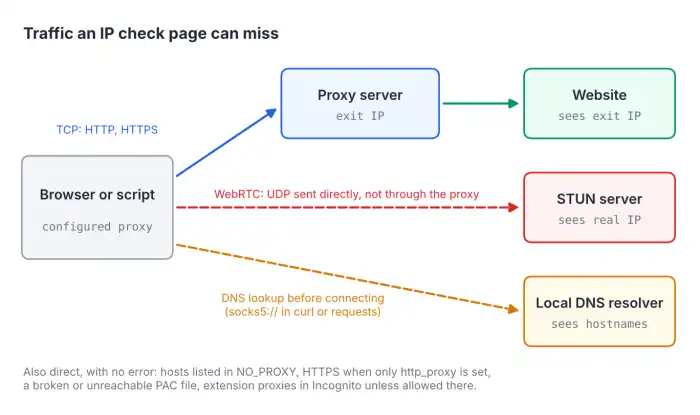
In our Chrome 153 tests through local HTTP and SOCKS5 proxies, a page loaded through the proxy still sent its STUN request over UDP straight from the machine, so the STUN server saw the device’s own address. Only the disable_non_proxied_udp policy stopped it (the WebRtcIPHandling policy for administrators, the chrome.privacy API for extensions). Chrome’s SOCKS5 carries TCP only, so switching protocols does not help.
DNS leaks depend on the client more than the protocol. curl 8.5.0 and Python requests 2.34.2 resolved hostnames locally with socks5://, while httpx 0.28.1 and Go 1.24 sent them to the proxy either way. Chrome with an HTTP proxy made zero DNS queries of its own, and a PAC script calling dnsResolve() resolved names on the computer even though traffic went through the proxy. Sites combine these signals with ASN and reputation data, as covered in our breakdown of how websites recognize proxies.
A repeatable workflow for verifying a new proxy
This is how to check a proxy server’s IP address end to end before relying on it for localized search checks, ad verification or price monitoring.
- Record your real IP with the proxy off and the proxy variables unset.
- Confirm the entry address and protocol where traffic starts: OS settings, app settings or the PAC file.
- Query two different echo services through the proxy. The exit IP must differ from your real IP and match on both.
- Compare it with the dashboard IP (static proxy) or run the loop below (rotating proxy).
- Repeat the lookup in the exact browser profile or app you will use.
- Run a WebRTC test and a DNS leak test in that same profile.
- Check the country and ASN in two geolocation databases. If they disagree, the one your target site licenses wins, and that is rarely documented.
- Log the IP, ASN, country and time, so a later failure can be traced to the proxy or the target.
Checking rotating proxies and sticky sessions
For a rotating gateway, one address proves little. You need the distribution:
for i in $(seq 1 20); do curl -s -x http://USER:PASS@GATEWAY:PORT https://api.ipify.org; echo; done | sort | uniq -c | sort -rn
Per-request rotation should give close to 20 distinct addresses; a few repeats are normal in small city pools. A sticky session should show one IP until it expires, so rerun the loop after the limit. When the peer behind a sticky session goes offline, most gateways quietly switch you to a new IP. Bright Data’s -const option and Oxylabs’ sessid_oneip return a 502 instead, and IPRoyal’s _killswitch-1 returns HTTP 410. If a silent IP change would break your task, enable these and treat the error as the signal.
Expect a slow first response. Our bench counted round trips to the proxy for a first HTTPS request: 3 direct, 4 through an HTTP proxy, 6 through SOCKS5 with a password. With the proxy 150 ms away, that is 600 to 900 ms before the target adds its own time. A reused connection needs one round trip.
How proxy providers expose the exit IP
A bare IP confirms routing; ASN and multi-database geo data help with location disputes. Prices below are list prices for the smallest self-service purchase without coupons. The author works with Proxys.io.
| Provider | How to see the exit IP | Sticky session control | Residential | Static or datacenter |
| Proxys.io | Free web Proxy Checker; on static plans the dashboard IP is the exit IP | Static IPv4 and IPv6 keep one address for the whole rental | $4/GB | IPv4 from $1.40/IP, IPv6 from $0.13/IP per month |
| Bright Data | brdtest.com/myip.json (JSON with ASN and city) | Session ID in the username; ends after 5 min idle | 8/GBpayasyougo(4 with a 3-month coupon) | $1.40/IP per month at 10 IPs |
| Oxylabs | ip.oxylabs.io/location: five geo databases | sessid in the username, up to 1,440 min | $6/GB in plans from $30/month | from $1/IP |
| Decodo | ip.decodo.com/json: IP, ASN, ISP, city | sessionduration in the username, up to 1,440 min | $4/GB pay as you go | $0.60/GB |
| IPRoyal | Docs use third-party ipv4.icanhazip.com | _session and _lifetime in the password, up to 7 days | $7.35/GB | $1.57/proxy per 30 days |
| Webshare | ipv4.webshare.io (plain IP) | Numeric session ID in the username, up to 24 hours | $3.50/GB | Free plan with 10 proxies |
A static IP makes the check binary: the exit IP matches the dashboard or it does not, with no session logic to debug. Proxys.io sells static IPv4 and IPv6 with HTTP(S) and SOCKS5 on every address, login or IP authorization, and refunds within 24 hours of payment, enough time to run the workflow above and return an IP that fails it. Its free Proxy Checker takes IP:port:login:password in one line and reports in 5 to 10 seconds whether the proxy connects. It answers “does it work”, not “where is it”, so the geolocation lookups still apply.
When the problem is the provider, not your setup
Once client-side causes are ruled out, these signs point at the proxy itself:
- The exit IP of a static proxy differs from the dashboard or changes without notice.
- Two of three geolocation databases place it outside the country you paid for.
- The ASN belongs to a hosting company while the product is sold as residential or mobile.
- The IP is on public blocklists such as Spamhaus on the day you receive it.
One mismatch can be database lag. Two or more on the same IP justify a replacement request, and the same pattern across several IPs is a reason to change providers.
Frequently asked questions
Is a proxy address the same as a proxy IP address?
Not always. The proxy address is the host and port you connect to; the IP websites see is the exit IP. They match on most static proxies and differ on rotating gateways.
How to check a proxy server’s IP address without installing anything?
Open ipinfo.io in a browser that uses the proxy and compare it with the same page on a direct connection. curl ships with macOS, most Linux distributions and Windows 10 version 1803 or later, so the command-line check needs no downloads either.