
Evaluating a powerpoint to video converter helps small B2B consultancies break a frustrating weekly habit: a tailored proposal deck reaches an enterprise champion, gets forwarded internally without spoken commentary, and leaves three busy buyers misreading the pricing structure completely. Turning static slide files into concise narrated briefings aligns buying committees before procurement even opens the spreadsheet.
Not every workflow solves the same commercial bottleneck. Recording a live screen session captures natural tone on the first try, native desktop presentation exports eliminate microphone steps for simple kiosks, and layer-aware cloud tools preserve scene editability when client pricing or timelines inevitably shift a day later.
If you only need a rapid rough internal alignment check before an afternoon sync between two close teammates, recording a two-minute casual webcam screen share remains plenty fast enough. Dedicated conversion workflows pay off once deliverables travel externally to buying committees, reseller channels, or multi-language enterprise prospects.
Comparing every powerpoint to video converter workflow side by side
Evaluating a powerpoint to video converter purely by export speed misses where revenue operations teams lose hours during follow-up revisions. Compare how three practical approaches hold up once real buyers ask for pricing adjustments or localized copies:
| Evaluation Criterion | Manual Screen Recording | Native Presentation File Export | Layer-Aware Cloud Slide Studio |
|---|---|---|---|
| Edit cost on single price change | Re-record entire slide section cleanly | Edit deck then manually swap external audio | Update single scene text and voiceover |
| Slide text layer editability | Flattened screen pixels | Editable locally before export | Editable scene layers from .pptx files |
| Speaker notes to script flow | Read awkwardly off second monitor | Manual timing clicks per slide | Auto-imports .pptx notes into scene cards |
| Multi-market language scaling | Record separate human read-throughs | Export flat copies without sync tools | Translates draft text and audio cleanly |
| Common team bottleneck | Audible breath pauses and mic mismatch | Silent timing loops lacking clear context | Initial template alignment for messy fonts |
Findings from Nielsen Norman Group on video usability demonstrate why short, targeted audio explanations keep professional buyers watching while silent wall-of-text exports lose engagement almost immediately.
Where live screen capture breaks during client revisions
Screen recording wins on spontaneity when a founder answers one specific question from an inbound lead. Yet scale exposes three practical problems across recurring account management:
- Changing one quarterly discount figure on slide six forces the rep back behind a desk microphone, trying to match yesterday’s acoustic room tone and vocal energy across an entire five-minute walkthrough.
- Local laptops frequently drop mouse cursor focus or capture desktop notification banners mid-take, forcing account executives through three or four retakes per prospect.
- Sharing uncaptioned recordings with noisy audio creates comprehension gaps when buyers open links quietly between airport gates or open-plan office floors.
For teams building repeatable onboarding sequences, product tier explainers, or standard quarterly business reviews, manual screen recording consumes senior selling hours every single time a minor SKU figure shifts.
Moving B2B decks cleanly into modular scene editors
Switching into a cloud PowerPoint to video workflow shifts revision from linear timeline surgery to modular scene cards. Importing a .pptx deck keeps slide text elements and embedded speaker notes accessible inside the workspace, whereas flat .pdf files preserve layout geometry without editable individual text frames.
Once scenes populate inside the Studio timeline, small sales teams customize deliverables rapidly without video engineering specialists:
- Trim verbose bullet slides down to short anchor labels while transferring nuanced contract caveats into spoken script fields per scene.
- Select either a grounded spoken voice track or direct presenter-free narration (No avatar) so buyers inspect pricing comparison grids unobstructed.
- Add crisp high-contrast subtitles below slide frames and check audio bed levels between 0 and 4x so background ambiance never fights clear product explanation.
- Duplicate finalized proposal projects whenever an adjacent vertical client opens conversations, modifying industry use cases and company names inside individual scenes in minutes.
- Replicate clean project copies directly across target international accounts for multilingual champions using structured script translation prior to export.
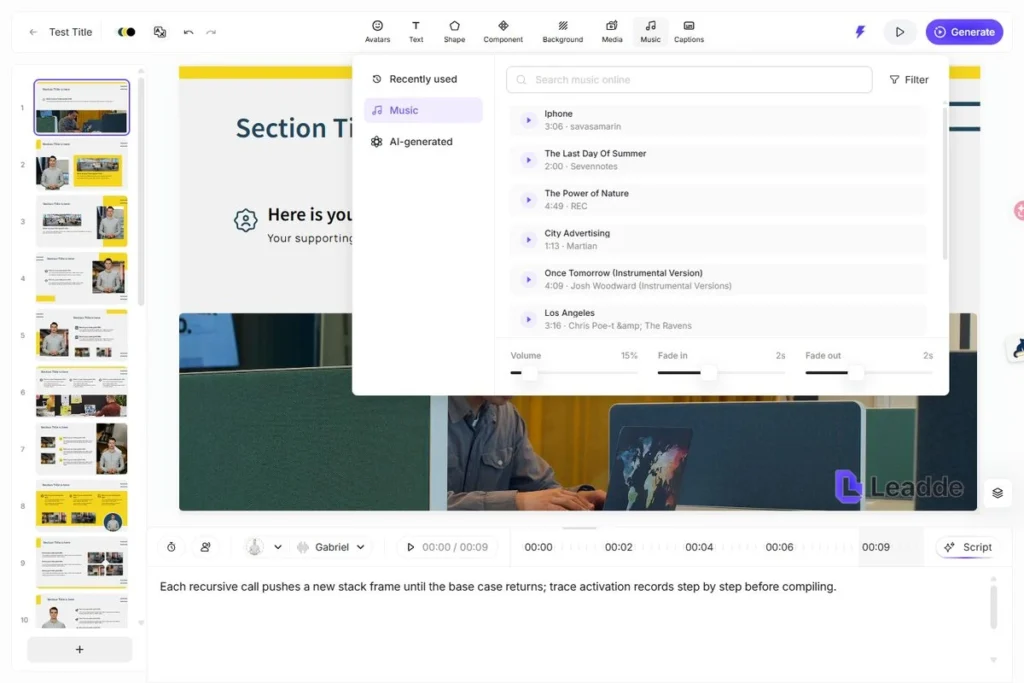
Balancing scene narration pacing and ambient background audio levels inside Leadde without re-recording earlier slides.
Checking timing in desktop Chrome ensures smooth canvas playback and responsive subtitle legibility before sending secure share links straight to procurement leads.
Choosing the right workflow for your team size
Sole technical founders pitching five bespoke accounts a quarter rarely need structured localization pipelines or reusable brand kits. When one founder controls pricing changes personally and buyers welcome authentic unedited screen recordings, lean manual capture saves subscription overhead.
Conversely, growing consultancies and B2B SaaS teams shipping standard demo decks, partner enablement briefs, and localized client proposals weekly recover their setup effort almost immediately inside layer-based Studio editors. Saving approved slides inside centralized Brand Kits and keeping historical project snapshots protects sales messaging consistency long after initial pitch season ends.

Evaluating each powerpoint to video converter against revision cost rather than first-draft export time shows clearly where each method shines: pick raw screen capture for spontaneous answers, native export for silent lobby loops, and layer-based cloud studios wherever client edits and regional teams meet.
Frequently asked questions
Does uploading a .pptx file differ from exporting slides as .pdf first?
Yes. Native .pptx imports retain editable slide text blocks and speaker notes inside scene cards, whereas .pdf slides render cleanly as fixed visual backgrounds requiring fresh manual narration scripts.
Should B2B sales walkthrough videos include background music?
Keep formal procurement or pricing reviews clean with subtle acoustic levels near zero, reserving soft ambient music strictly for light upper-funnel brand overviews where background texture supports mood without masking voice clarity.
Can sales teams update one pricing figure without starting over?
Yes. Inside scene-based editors, you edit the outdated text line or script block on that individual slide card and re-export the updated cut while leaving untouched sections intact.