Best Free PDF Editor in 2024 [Must Read]
Written by
- Redaction Team
- Business Technology, Entrepreneurship
A PDF editor is a tool that allows users to create, modify, annotate, and organize their PDF documents.
Due to consistent formatting across multiple platforms, PDFs are widely used to share and present documents. Further, users can make changes to existing PDFs like adding or removing text, and images, or converting pdf to Word.
To conclude, PDF editors are indispensable tools for smooth document management and communication. In this article, we will introduce the best free PDF editor in 2024. Read this article to select the best PDF editor and convert PDF to Word.
![Best Free PDF Editor in 2024 [Must Read]](https://barrazacarlos.com/wp-content/uploads/2024/01/Best-Free-PDF-Editor-in-2024-Must-Read.webp "Best Free PDF Editor in 2024 [Must Read] 1")
Part 1: What to Look For in the Best Free PDF Editor?
When you select the best free PDF editor, you’ll see a big difference while working with documents. There are some particular things that you should look for in a PDF editor and make your editing easier.
- Easy to Use: A top-notch PDF editor should be simple and easy to use. It’ll make it easier for everyone to navigate and edit documents smoothly.
- Text Editing Capabilities: It is important to be able to edit texts. Search for a PDF editor that allows you to add, change, or delete text effortlessly. Text editing features are necessary for updating and fixing your documents.
- Easy Form Filling: Ensure your PDF editor supports form filling if you deal with forms a lot. This feature allows you to fill out forms right in the PDF. Also, it’ll save you from printing and filling them out by hand.
- Page Management Options: It is a big deal to handle pages efficiently, especially for longer documents. Try to find a PDF editor that helps you change the order of pages, remove unwanted ones, or add new ones. It will make organizing your PDFs a breeze.
- Keep Things Secure: You need to consider the privacy of your data. Good PDF editors have basic security features such as password protection and encryption. It’ll help you to keep your edited PDFs safe and private.
Part 2: Best Free PDF Editor to Convert PDF to Word
Are you in search of the best free PDF editor? Well, we’ve got you covered since we’ll introduce the 7 best free PDF editor to convert PDF to Word below –
1. SwifDoo PDF

SwifDoo PDF is the best free PDF editor for Windows that helps you to convert PDF to Word. You can change or delete images/text, and add links, texts, or backgrounds with SwifDoo. Additionally, it helps you to annotate PDF files. This PDF editor supports conversion, compressing, and splitting PDF files. Further, SwifDoo can be a good choice if you desire an affordable all-in-one solution. This easy-to-use tool doesn’t require much space on your computer. Plus, it works on Windows 10, 8.1, 7, XP, and the latest Windows 11.
Pros:
- Helps you to edit PDF images and crop the pages of PDFs.
- Allows you to add text or text boxes whenever you want.
- Supports converting PDF files into Word, CAD drawings, images, and vice-versa.
- You can translate your PDF files into other multiple languages.
- Takes the help of AI to streamline PDF processing smoothly.
Cons:
- SwifDoo PDF doesn’t provide any Mac version.
Foxit PhantomPDF is a well-known tool that lets businesses edit PDFs. This software offers multiple editing options, security features, and tools for collaboration. Teams can create, mark up, and protect their PDFs easily with PhantomPDF. Furthermore, you can combine or divide documents, add e-signatures, create forms, and convert PDF to Word. Again, this software allows you to change track, connect to the cloud, etc.

Pros:
- You can collaborate with your teams and enhance the document quality.
- Helps you to convert PDF to Word, Excel, and other formats.
- Allows you to add headers, footers, and e-signatures in the PDF documents.
- Supports protecting your document in a better way.
Cons:
- Doesn't offer a simple and efficient user interface to use.
- You have to purchase advanced features with additional payment.

Another powerful PDF editor, Nitro PDF Pro comes with many fancy and efficient features. This tool offers all the tools you require to work with PDF files. You can add, remove, and change text and images in your PDF files using Nitro PDF Pro. Moreover, this tool lets you add logos, watermarks, clickable links, and bookmarks. You can also convert PDF to Word, PowerPoint, Excel, and vice-versa. Additionally, Nitro PDF Pro provides you with features like notes, password protection, e-signatures, and OCR.
Pros:
- Allows you to add images, notes, annotations, links, logos, etc. to your PDF files.
- You can change your PDFs into Word, Excel, and PowerPoint.
- Helps you to combine different PDF documents into a single document.
- Supports collaboration with your teams and annotates your PDF files.
Cons:
- This program is not suitable for small businesses.
- There is no live chat or phone call option for customer service.
4. Sejda
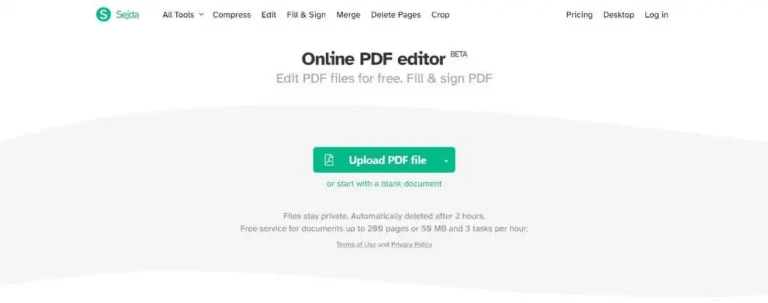
Sejda is a web-based PDF editor that lets you edit and convert PDF to Word online. This user-friendly software allows you to edit, merge, mark up, and split PDF documents with ease. In addition, you can add images, text, and watermarks, and hide sensitive info for extra security. Plus, you can convert PDFs to different formats and make the file size smaller. Shejda provides you with all the PDF editing tools and lets you edit your PDFs.
Pros:
- Allows you to edit multiple documents easily.
- It doesn’t have any page or hour limitation.
- Supports adding watermarks, text, images, etc. to your PDF files.
Cons:
- This PDF editor is not as safe as others mentioned in this guide.
- Users find the user interface quite confusing.
5. SmallPDF

Smallpdf is a useful online program that helps you convert PDF to Word and edit them. It allows you to edit, convert, compress, and protect PDF documents. You can easily add images, text, and signatures with its user-friendly interface. Further, this software can be used on numerous operating systems and devices. Plus, you can marge, rotate, split, or delete pages in PDF files.
Pros:
- Offers you multiple editing and conversion features.
- Doesn’t require you to create an account to edit your PDFs.
- Allows you to edit and convert more than 2 files per day.
Cons:
- Doesn’t provide premium features in the free version.
- It has limitations over the file number.
6. PDFelement

PDFelement is a well-known PDF editor that makes it easy to manage your PDF files. This software offers multiple useful features and a simple user interface. You can edit PDFs, highlight text, and convert PDF to Word. Additionally, it helps you to sign documents and fill out forms. Furthermore, you can collaborate in real time with others, track changes, and leave comments.
Pros:
- Allows users a free trial version before purchasing it.
- A user-friendly interface is provided for both beginners and experienced people.
- Helps you to edit or extract PDF files from scanning.
Cons:
- You need to purchase the software once the free trial is finished.
- It has limitations over the features in the free trial version.

The last one is Lumin which lets you edit and convert PDF to Word online. The free version allows you to add notes and signatures. However, you can get extra features in the paid version. Lumin supports working with Google Workspace. This software will save all your work quickly to Google Cloud storage. You’ll find this software useful if you like to use Google for everything. In addition, it helps you to collaborate on editing PDFs. You’ll get many standard tools in Lumin such as filling out forms, drawing, and convert PDF to Word.
Pros:
- Supports working with Google Workspace.
- Saves your work immediately to Google cloud storage.
- Allows you to collaborate with others and edit PDF files.
Cons:
- It has limitations over features in the free version.
- You have to purchase the paid version and enjoy extra features.
Part 3: Editors Verdict
SwifDoo stands out as the best one after looking at different free PDF editors. This easy-to-use software lets you edit text, fill forms, manage pages, and keep your PDFs secure. SwifDoo is the top choice in 2024 for editing PDFs and converting them to Word or other formats. Further, it is not only good at editing but also affordable and versatile. You can try this tool if you want a reliable and feature-packed PDF editing tool.
Conclusion:
In this article, we introduced the best free PDF editor in 2024. You can try any of the above-mentioned PDF editor for editing your PDFs. However, SwifDoo PDF is the best if you’re looking for a good and free PDF editor. This software offers multiple editing features without costing much. You can easily edit PDF files and convert them into Word or other formats. Try SwifDoo PDF for a smooth and affordable PDF editing experience!
More about Business Technology